Your Sony remote, on your iPhone.
Lost your Sony remote? LazyBinger turns your iPhone into a full remote for your Sony TV running Bravia — auto-detected on your Wi-Fi, with zero setup.
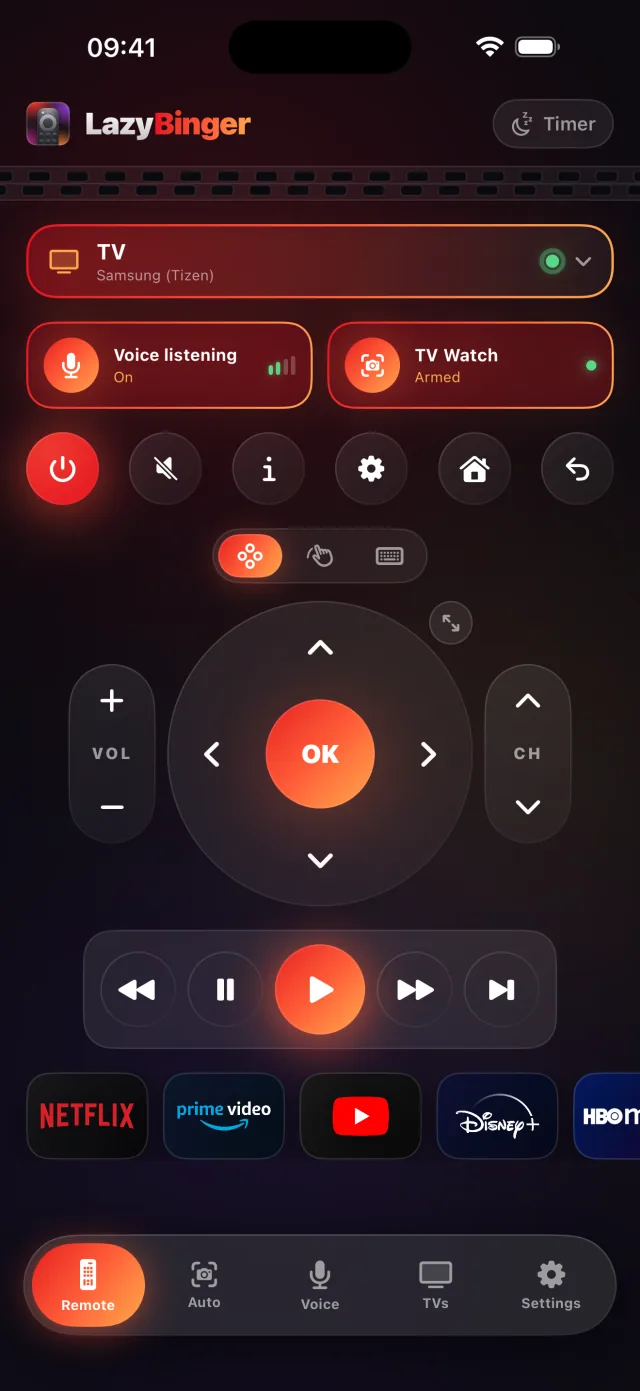
Everything your iPhone drives on your Sony
- Power, navigate and set the volume on your Sony — from your bed.
- Full D-pad, play/pause and a keyboard for typing into search.
- Eleven one-tap apps: Netflix, Prime Video, Disney+, YouTube…
- Premium: voice magic words (“sleepy time”) and camera intro auto-skip.
Which Sony TVs work with it?
LazyBinger finds Sony TVs running Bravia automatically on your Wi-Fi. It's used across Sony's line-up, including:
- BRAVIA XR
- BRAVIA OLED
- BRAVIA LED
No model number to look up — if your Sony is on the same Wi-Fi, it usually just shows up.
Connect your Sony in 30 seconds
Open LazyBinger: your Sony shows up on Wi-Fi by itself. One tap and it's paired.
After that everything runs over your local network — no account, no cloud. Wake-on-LAN even powers your Sony back on from across the room in the morning.
Sony not showing up? Quick fixes
- Put your iPhone and your Sony on the same Wi-Fi network — not a separate guest or “IoT” network. That's the number-one reason a TV won't appear.
- Wake the Sony and leave it on its home screen while LazyBinger scans. A TV in deep standby can stay invisible until it's powered on once.
- If your router has “AP isolation” / “client isolation” on, or splits 2.4 GHz and 5 GHz, turn isolation off so your iPhone can reach the Sony.
Frequently asked
- Does LazyBinger work with every Sony TV?
- With connected Sony TVs (Bravia) on the same Wi-Fi as your iPhone. They're detected automatically — no address to type in.
- Do I still need the original Sony remote?
- No. Once paired, you control your Sony entirely from the iPhone. The real one can stay under the couch.
- Is my Sony data sent anywhere?
- No. Discovery and control of your Sony stay on your local network; voice and camera are processed on the iPhone. No account, no tracking.